
30–60
min / photo
The clock eats your evening
A listing should hit the MLS the day it's shot. Masking, cutting out furniture and color-matching one room can run an hour — and a shoot is a dozen rooms.
AI virtual staging vs Photoshop
Before you sink another evening into layers and masks, see the honest trade-off — side by side. One of these takes about fifteen seconds.
The Photoshop way
30–60min / photo
The Vestaro way
15seconds / photo
2 free renders · no signup
№ 08 — In the field
Working with listing teams across Los Angeles, Charlotte, Chicago, and a steady handful of independent brokerages.








What fifteen seconds buys you
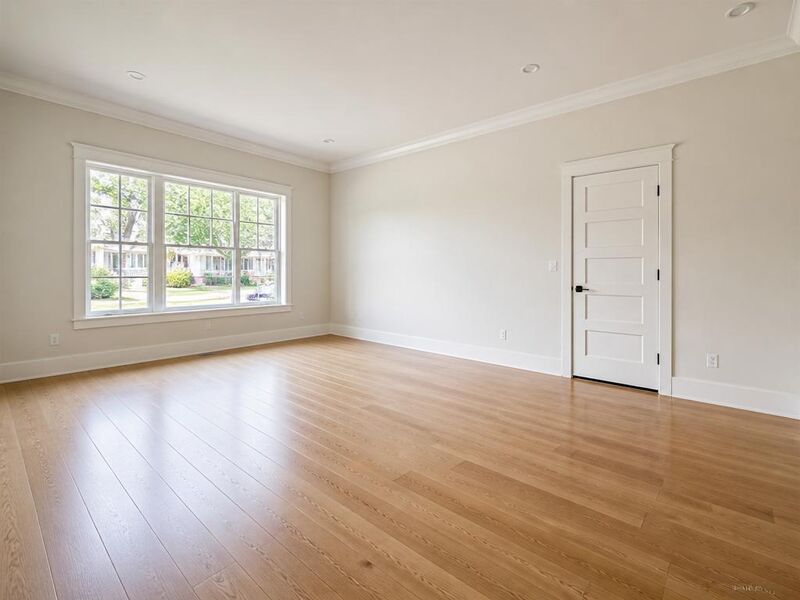
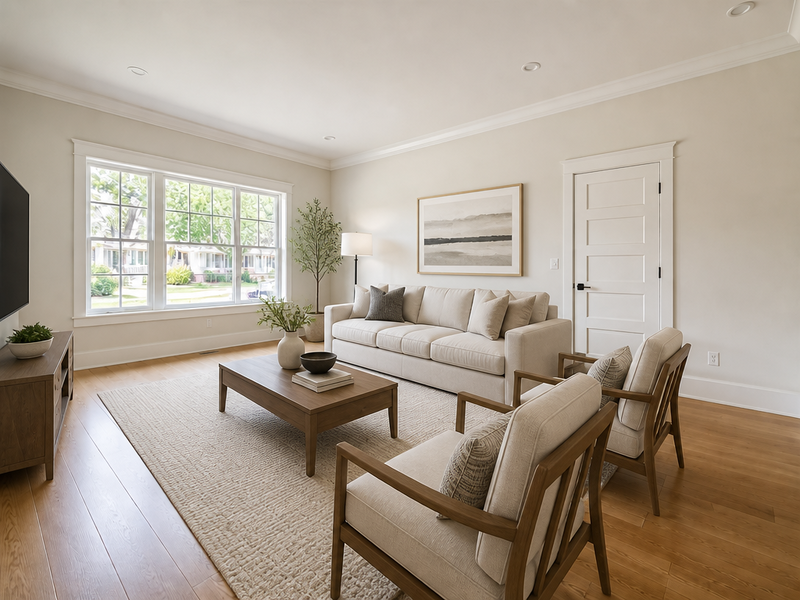
No masking, no compositing, no furniture library to build. The same empty room a buyer would scroll past — furnished, lit and MLS-ready, straight from the upload. Drag the handle and see for yourself.
 AvantAprès
Where Photoshop staging gets stuck
It is a genuinely powerful editor. But for listing staging specifically, four things slow agents down again and again.
A listing should hit the MLS the day it's shot. Masking, cutting out furniture and color-matching one room can run an hour — and a shoot is a dozen rooms.
Convincing composites take perspective matching, shadow work and lighting sense. Most agents do not have the Photoshop reps, and the half-finished look reads as fake.
Photoshop gives you tools, not a sofa. You buy or build a cut-out library and place every piece by hand — at the right scale, angle and lighting.
Stage one photo and the next angle of the same room is a fresh job. Keeping furniture identical across a 12-photo set is manual bookkeeping nobody enjoys.
Side by side
Where each approach actually wins. We left in the one row Photoshop takes — because it does.
| Photoshop | Vestaro | |
|---|---|---|
| Turnaround per photo | 30–60 minutes | About 15 secondsSame speed for 1 or 200 photos |
| Skill required | Intermediate–advanced editing | NoneUpload and pick a style |
| Furniture & decor | You source your own assets | Built-in libraryDesigner styling, included |
| Cost | Software + your hours | From $0.71 / photoTop annual plan |
| Photorealism | Depends on your skill | Consistent, listing-gradeShadows & perspective auto-matched |
| Multi-photo consistency | Manual, per angle | Multi-view stagingSame furniture across the set |
| Pixel-level retouch control | Total — every pixel | Guided, not freehandRe-prompt and regenerate |
| Learning curve | Weeks to months | Minutes |
Comparison reflects typical agent workflows and Vestaro’s published pricing. Photoshop keeps full pixel-level control — see “when to still reach for Photoshop” below.
When each one wins
The right tool depends on the job. Choose a scenario to see the honest call — and yes, sometimes it’s Photoshop.
A same-day listing can’t wait an hour per room. Vestaro furnishes the space in about 15 seconds, MLS-ready, so the staged photo — not the empty one — is what buyers see first.
Run your own numbers
The software is the cheap part — your time is the expense. Set your volume and see the monthly difference.
Adjust to match a typical month.
That’s 36 photos a month — about 27 hours of Photoshop work at 45 min each.
Monthly cost to stage 36 photos
You’d save
$1,324 / mo
About 27 hours back every month — roughly $15,893 a year.
Estimate only. Assumes 45 min/photo in Photoshop and Vestaro at $0.71/photo on the top annual plan. Your real numbers depend on your editing speed and plan.
30-second gut check
Four quick questions. We’ll point you to the approach that fits your workflow — honestly.
Question 1 / 4
No hype — the real answer
AI staging isn’t the answer to everything. Here’s the honest split so you pick the right tool for the job in front of you.
Reach for Photoshop when…
Reach for Vestaro when…
Common questions
On standard listing photos — empty rooms, normal angles, decent light — yes. Vestaro’s output reads as fully staged, listing-grade work and matches shadows and perspective automatically. For a single editorial hero shot where you need pixel-perfect retouching, a skilled Photoshop artist still has more control. For everyday listing volume, AI wins on speed and consistency.
No. You upload a photo, pick a room type and a style, and the staged result appears in about 15 seconds. There are no layers, masks or selection tools to learn. If you can drag a file into a browser, you can stage a room.
For staging specifically, almost always. Photoshop is a monthly subscription on top of the furniture cut-outs you buy or build — and the real cost is your time at 30–60 minutes per photo. Vestaro starts at $0.71/photo on the top annual plan, with the furniture library and styling included.
Virtual staging is allowed in every US market as long as it’s disclosed and you don’t alter permanent structural features. That’s true whether you stage in Photoshop or with AI. Vestaro keeps walls, windows and architecture intact and the output is MLS-ready; you add the standard “virtually staged” caption.
Yes. Many agents use Vestaro for the heavy lifting — furnishing the whole room in seconds — then do any final one-off tweak in their editor of choice. You’re not locked out of Photoshop; you’re just not starting from an empty room anymore.
Your first 2 renders are free, no signup and no credit card. Upload one of the empty rooms you’d otherwise be masking tonight and compare the staged version against the hour it would have cost you in Photoshop.
No signup, no layers, no learning curve. Upload an empty room you’d otherwise be masking tonight, and see the staged version before your coffee cools.
Keep comparing